|
Adding Pages To Your
Website
Before you can edit a page,
you must add it to your website. When you add the page it is
automatically added to the main menu. If you do not want to
include it in the main menu you can exclude it.
Page names can be up to 25
characters with Letters Numbers and Spaces. You can not use any
special characters other than dashes and underscores. The names
should be what you want the menu to say. For example if your page
is about Jewelry, name it "Jewelry". Don't name it
"page1007". You can name the page with a coded name if
you plan to exclude it from the main menu or if you want that
specific name to appear in your menu. For example if you have an
item name "Item-1007" and it will have its own page on
the main menu.
Make sure when you name the
page you use the proper capitalization and spelling. You can
rename a page at any time and update your menu, but if the page
is linked by you from internal text links, the links will not go
to the new page name.
Too add a page click on the 
Clcik the "Add A Page"
link.
Then simply fill in the form
with the page name you want. You will see a list of current
pages, as you can only use a name one time. But remember,
computers are case sensitive. So "Jewelry" and "jewelry"
are two seperate pages. You are building pages and computers
requre very specific input, they can not intepret data as people
can. So you will need to be the one that is careful with your
text and spelling. If you later want to link to the "Jewelry"
page and type in "jewelry" the link can not find the
page.
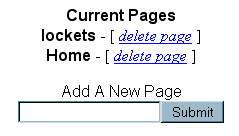
As soon as you submit the page you can
return to the to edit the page.
|