|
Arranging
Buttons In A Specific Order
The images or text links that make up your
main page navigation menu can be arranged in a specific order.
The order is relative to the placement of the menu.
If you are using buttons on either side of
the page, the defined order is "top to bottom". If the
buttons are on the top or bottom of the page, the defined order
is from "right to left".
To set the order of the buttons
> Click "Page Properties"
> Click "Define Menu Button/Links Order"
You will find a list of the pages you have
and the order they are currently listed. Select the Button you
want in each position. If you select a button twice, only the
first position will appear on the page. Any new pages added after
the button order is selected will appear at the end of the order.
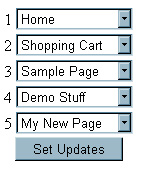 |
The number to the left of each image is the
position it will appear in the order. Essentially your
menu will look just like this one with the boxes replaced
by your actual buttons. |
Once you have set the order you want,
simply click the "Set Updates" button and you have
successfully updated the order of your buttons.
|