Return To Website Management Console
How to enable cookies
Netscape Navigator (Version 4)
Under
E
dit select Pr
e
ferences.
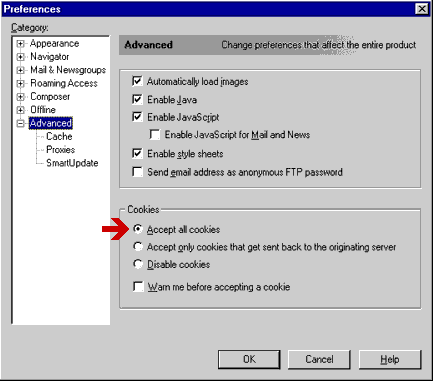
In the 'Preferences' window select 'Advanced.'
On the right-hand side 'Advanced' panel select '
A
ccept all cookies.'
Enabling cookies with Netscape Navigator
©1997-2021
pageBuzz.com®
&
BumblebeeWorks.com
Software Systems
pageBuzz® and pageBuzz.com® are registered trademarks of
The Cyber Web Inc