|
Advanced
Layout Colors
The Advanced Layout Colors section allows
you to select all colors for the advanced layout you selected. If you did not select an advanced layout, you will
get an error message telling you that you did not select an
advanced layout.
Each advanced layout has different sections.
Some layouts have your main menu at the top and the bottom while
some have the menu on the side. Some layouts have borders while
others do not have any borders. You can choose colors for these
sections.
When you get to the Advanced Layout Colors
screen, the system will show you the options you have available
on the right hand side of the screen. On the left hand side you
will see a list of numbers with boxes next to them.
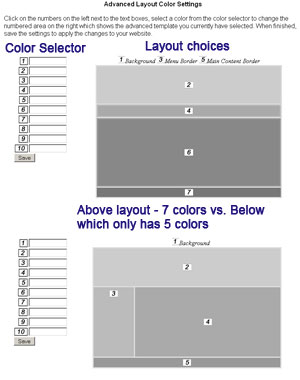
To select the colors for your
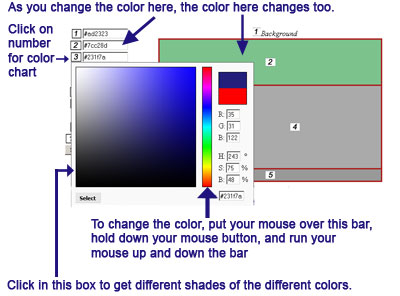
advanced layout, click on the number in the Color Selector
section. When you click on the number, you will get a pop out
chart (see below). The color chart uses something called
JavaScript. You should be able to run your mouse up and down the
color chart (make sure you're holding down the mouse key) and see
different colors (see below). Depending on the browser you are
using (whether on a Mac or a PC), you may encounter problems.
Microsoft has a long running battle with Sun Microsystems, which
is the company that developed JavaScript. Therefore, some
versions of Internet Explorer will work with Java while others do
not. Apple, on the other hand, just did not accommodate Java in
some versions of Safari. We were told that newer versions of
Safari should be fine but some customers reported problems. Thus,
if you do encounter problems with either Internet Explorer or
Safari, we recommend that you download Mozilla Firefox. It is
free and will generally work better. You can download Mozilla
here: https://www.mozilla.com.
Changing the colors does not
affect your content.
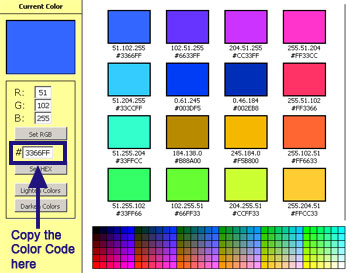
If you experience problems but
do not want to download another browser, you can copy and paste
the Color Code directly.

If you are having problems
getting the colors you want, you can use this color chart here.
Make sure you Save your
settings when you finish. You can see your changes right away by
clicking on the Website Home icon at the top. You may need to refresh your page.
|