|
Background
Image
The standard templates, every advanced page
layout, and most of the basic page layouts, allow you to change
the background color to an image. NOTE:
You cannot make these changes to the Boutique Templates.
If you want to select a plain color, you
can do that under Page, Font & Link Colors. If you currently have an image that you
selected from the gallery but want to have a plain color,
you can delete the image under Choose Background Image from
Gallery. If you currently have an image that you uploaded
yourself, you can delete the image under Upload Your Own
Background Image.
Under the Background Image section, you can
Choose Background Image From Gallery or Upload Your own
Background Image.
Choose Background Image From
Gallery
We provide you with over 5,000 background
images that you can use for your website. To use these images,
click on the name of the category, such as Beige, find the
background you want to use and then click on the Change button
below the background. You can then click on the Website Home icon
at the top to see the change in your website. If you do not see
the change, be sure to refresh your page. If
you refresh your page and still do not see a change, you are
likely using a Basic Page Layout. Make sure that you selected a
layout that allows for a background image.
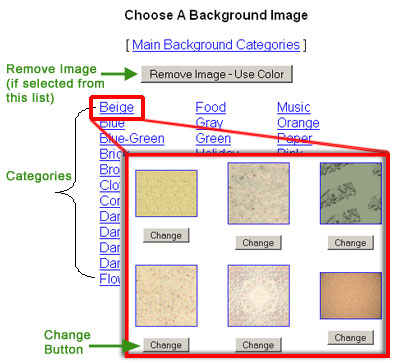
If you have an image that you
selected from the Background Gallery provided but would like to
use a plain color instead, then click on the Remove Image - Use
Color button.
Upload Your own
Background Image
If you have your own image
that you would like to use as a background, you can upload that
image by clicking on the Upload your Own Background Image link.
Then click on Browse, find the image in your computer, and click
on the Upload Background Button. Your image will appear on the
page under the Your Image section.
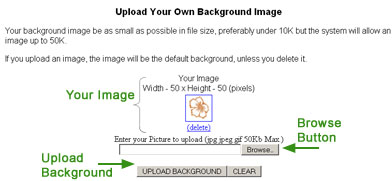
You can then click on the
Website Home icon at the top to see the change in your website.
If you do not see the change, be sure to refresh your page. If
you refresh your page and still do not see a change, you are
likely using a Basic Page Layout. Make sure that you selected a
layout that allows for a background image.
|