|
Upload New
Template Title
The Upload New Template Title section
allows you to upload the title space you created using your own
image editor or some other image you want to use. If you are
using one of our templates, this section shows you the part of
the template you can use for the title space (under Original
Image which is first image on the page).
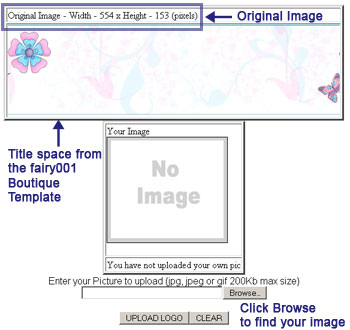
If you want to use your own image
editor to customize the title space, right click on the
image and save the image to your computer. Make your changes
using your program. Then upload your new image in this section.
The image below shows a modified title space. To get a similar
effect, you generally need to use advanced image editing software
such as PhotoShop or GIMP (which is similar to PhotoShop but free).
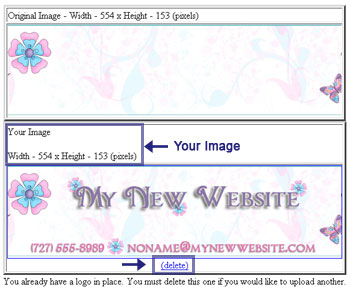
Notice that the system continues to display
the Original Image along with Your Image.
If you do not like Your Image, then click
on the delete link right below Your Image.
Note that the
system shows you the size of the Original Image. In the example
above, the image size is 544x153. This size is in pixels (not
inches or percent). So, if you are working with something other
than pixels, make sure you pay attention to that change. The
size is important because if you are uploading a different image
and that image is not the exact size, then your
image will be stretched or compressed
to fit that exact size.
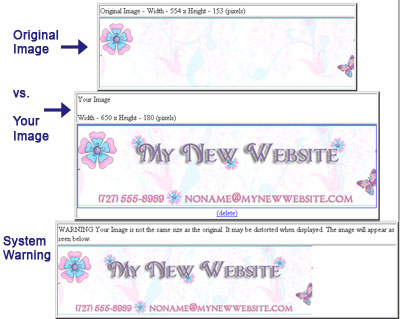
Below is an example when the image
is too big. With this particular image, it is difficult
to find the difference. But note, that will not the same will all
images. The larger and more detailed the image, the more likely
you are to have a problem.
Below is an example when the
image is too small. The problem here is pretty clear. Notice how
the system shows you how Your Image will appear on the website.
The lower image show a screen capture from the website where the
title space is incorporated into the full title image.
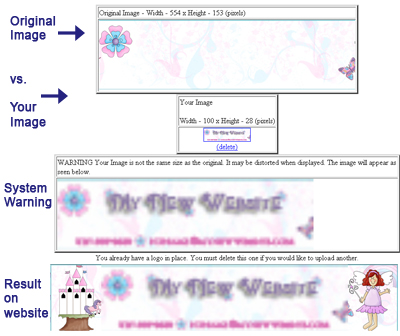
The two examples above show
why it is important to have Your Image be as close as possible to
the size provided in the Original Image.
|