|
Titles
& Meta Tags
The Titles and Meta Tags section allows you
to add page titles and meta tags for your pages.

Click on the drop down arrow. You will see
your pages listed in the list. Pick the page you want to edit and
click on Submit.
Page Titles appear at the top of people's
browsers. Page Titles are important for Search Engine
Optimization purposes. You should go through and add a page title
for every page. When writing page titles, make sure they are rich
in your key words. Try to avoid using words such as the, and, etc.
because you're just wasting space. Keep the title relevant to the
page and not just random key words. That is, the page title
should accurately represent the content on the page.

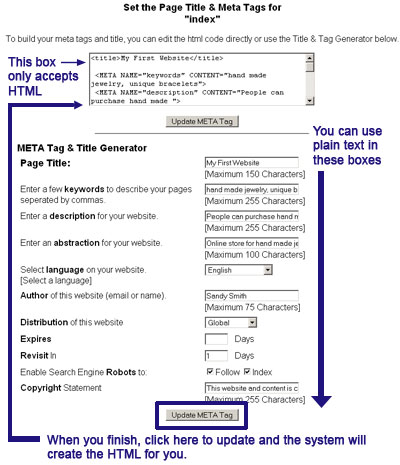
If you do choose to add meta tags, you will
need to fill in the boxes as shown above. Note, unless you are
adding HTML code, stay away from the first box. Start instead
with the box labeled Page Title.
- Keywords: the
keywords meta tags allows you to enter keywords to
describe your website. Make a list of the words you think
people will use to find your website and enter them into
this section.
- Description:
the description meta tag allows you to enter a
description of your website. You can use the same key
words from your keywords meta tag or use words that you
could not fit into your keywords section.
- Abstraction:
the abstraction meta tag is similar to your description
but much shorter.
- Distribution:
you have three choices: Global, Local and Internal Use (says
not intended for distribution on the internet). If the
page is for everyone to see, then the distribution should
be global.
- Expires: the
expired meta tag tells the search engines when the
content on that page will expire. If you are some sort of
special on this page, then use the expires meta tag to
tell the search engine to delete this page.
- Revisit In:
the revisit in meta tag allows you to tell the search
engine how often it should come back and visit that
specific page. If you update your website daily, then you
should set the number to 1.
- Enable Search Engine Robots
to: this meta tag allows you to tell the
search engine how it should treat the page. There are two
options: Follow and Index. Follow means that the search
engine spiders should read the page and follow the links
provided. Index means that the search engine should save
the page to provide as a result when someone does a
search.
When you finish making your additions,
click on the Update META Tag button. The system will save the
changes and provide you with the HTML code which you will see in
the first box.
|